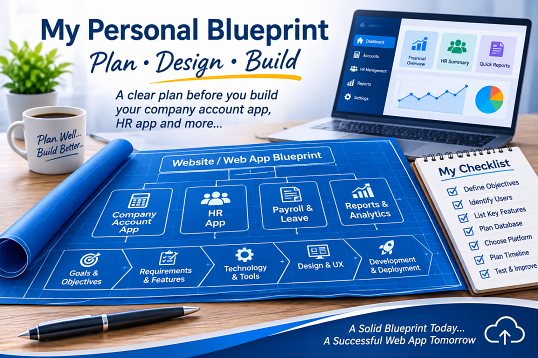
Web App & SaaS Build Guide: Plan, Design & Build
A comprehensive architectural checklist and AI prompt framework for building business operations, accounting, POS, and HR web applications—engineered upfront to avoid post-launch rewrites.
The 6 Architectural Pillars to Lock Down Before Coding
Domain, Subdomain & Deployment Strategy
- Shared SaaS vs. Client Subdomain: Decide upfront whether all companies log into one shared portal (
app.domain.com) or dedicated subdomains (client.domain.com) powered by one unified codebase. - HTTPS Enforcement: Always enforce Full SSL before testing—mobile browsers block camera access (for receipt OCR scanning) and native share sheets on HTTP.
- Marketing vs. App Separation: Keep public landing pages on the root domain and host the web application on a dedicated subdomain to isolate cookies and scripts.
Multi-Tenant Database & Audit Design
- Strict Tenant Isolation: Include a
tenant_idcolumn with composite indexes on every table so multiple businesses can share one database safely without data leaks. - Immutable Audit Trail: Log
user_id,action,old_value,new_value, and timestamp whenever a bill, payment, or expense is edited or voided. - Period Lock Dates: Allow admins to lock closed accounting months so historical P&L numbers cannot be altered accidentally.
Decoupled Billing & Staggered Payments
- Child Payment Ledger: Never overwrite a single
amount_paidfield. Store each partial payment in a separatebill_paymentstable with its own date and payment method. - Cash vs. Accrual Clarity: Track Invoiced Revenue separately from Collected Cash so staggered installments reflect accurately in monthly P&L reports.
- Bad Debt Write-Offs: Never delete unpaid invoices. Use a formal Write Off as Bad Debt status that zeroes the collectible balance while keeping history and flagging repeat defaulters.
Expenses, Job Costing & OCR Integrity
- Direct Job Linking: Allow linking supplier part receipts directly to a customer’s job/bill to measure true per-job profit alongside general overhead.
- Payment Source Tracking: Separate expenses paid via Company Bank, Petty Cash, and Staff Out-of-Pocket Claims.
- Duplicate Receipt Guard: Hash
(supplier + date + total)during OCR scanning to warn users before saving duplicate receipts.
Dual-Viewport UI/UX Standards
- Mobile Floor Mode (≤ 600px): Convert wide data tables into stacked cards, stack form inputs vertically at 100% width, and eliminate horizontal scrolling.
- Desktop Management Mode (≥ 601px): Display full structured tables with vertically stacked action buttons in the final column so rows never overflow the right edge.
- Accounting Table Discipline: Place the currency unit (e.g.,
RM) once in the header, right-align figures with thousand commas, and applywhite-space: nowrap.
High-Volume Speed & Print Engine
- Server-Side Pagination: Use SQL
LIMIT/OFFSETand debounced search from day one rather than loading thousands of rows into the browser DOM. - Poor-Signal Resilience: Disable submit buttons immediately on click with a loading spinner so double-tapping on weak cellular signal never creates duplicate records.
- Dynamic A4 Print / PDF Engine: Pull company logo, registration number, address, bank details, and QR code from a settings table to brand receipts, Statements of Account, and P&L reports automatically.
Real-World Financial & Operational Edge Cases
Simple apps assume every customer pays in full on the spot. Real businesses deal with deposits, corporate credit terms, partial installments, and non-paying clients. Every billing module must support this complete document lifecycle:
Asset & Customer History Lookup
Separate Customer Profiles from Vehicles/Assets (plate number, model, mileage, next service date). Entering a returning plate or ID should auto-fill client details, show past job history, and alert staff if the account has an overdue or blacklisted flag.
Role-Based Access Control (RBAC)
Staff records must connect to login permissions: Technicians/Staff can log work and upload receipts; Cashiers/Clerks can issue bills and record payments; only Owners/Admins can view P&L reports, write off bad debts, or edit locked periods.
Prototype Traps vs. Production Blueprint Standards
amount_paid column overwritten whenever a customer pays later—destroying payment dates and distorting monthly cash reports.payments ledger table logging every installment with its exact date, amount, and method, auto-summing the invoice balance.≤600px stacked cards & full-width inputs; ≥601px structured tables with vertically stacked action buttons.Interactive Pre-Build Checklist (Auto-Saved in Browser)
Master AI Prompt Templates (Copy & Customize)
Design a multi-tenant MySQL database schema and backend API structure for a [BUSINESS TYPE, e.g., Service & Workshop Management] web application.
Include the following mandatory standards:
1. Every table must include `tenant_id` with composite indexes on `(tenant_id, date)` and `(tenant_id, status)`.
2. Include a `tenants` settings table storing company name, registration no, address, phone, logo URL, bank details, QR image URL, and an accounting `lock_date`.
3. Decouple billing from payments: create `bills`, `bill_items` (categorized into Parts, Labor, Sub-contract), and a child `bill_payments` ledger table so staggered/partial payments on different dates are tracked individually.
4. Support full document statuses: `draft`, `unpaid`, `partial`, `paid`, `overdue`, `void`, and `bad_debt` (with written-off amount, date, reason, and customer blacklist flag).
5. Include `expenses` with payment source (`company_bank`, `petty_cash`, `staff_claim`), optional `linked_bill_id`, and `receipt_hash` to detect duplicate uploads.
6. Include `users` with RBAC roles (`owner`, `admin`, `cashier`, `staff`) and an `audit_logs` table recording old and new values on edits.
Build the frontend UI using clean, modular HTML, CSS, and vanilla JavaScript with strict dual-viewport responsiveness:
1. Mobile View (`@media (max-width: 600px)`): Convert all data tables into clean stacked cards so zero horizontal scrolling is required. Stack all filter bars and date inputs vertically at 100% width with large touch-friendly buttons.
2. Desktop View (`@media (min-width: 601px)`): Render full-width structured tables. In the final "Actions" column, stack action buttons vertically (`flex-direction: column`) so rows never overflow the right border.
3. Accounting Table Formatting: Display the currency unit (e.g., `RM`) once in the column header (`Amount (RM)`), omit repeated currency prefixes inside data cells, right-align all figures with thousand separators (`1,250.00`), and enforce `white-space: nowrap`.
4. Isolate each module/tab inside its own self-contained container so DOM updates never bleed across tabs, and disable submit buttons immediately on click to prevent duplicate submissions on weak connections.
Implement financial reporting, server-side pagination, and A4 PDF printing:
1. Server-Side Pagination: Fetch records using SQL `LIMIT/OFFSET` with debounced search and synchronized `From` / `To` date filters.
2. Profit & Loss (P&L): Calculate collected revenue from `bill_payments` within the selected date range (with an optional toggle for total invoiced accrual revenue), deduct categorized expenses and bad-debt write-offs, and display a clean 2-column accounting summary (`Description` | `RM`) plus category breakdown.
3. Accounts Receivable Aging: Group unpaid and partial balances into `0-30`, `31-60`, `61-90`, and `90+` day buckets with a 1-click WhatsApp payment reminder generator.
4. Dynamic A4 Print Engine: Build a clean print stylesheet and HTML generator that pulls company letterhead details and bank/QR info dynamically from the `tenants` table for individual receipts, Customer Statements of Account (SOA), and filtered P&L reports.